How Side A works
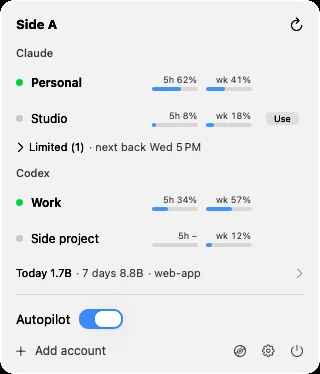
Claude Code and Codex plans come with a 5-hour and a weekly limit. Whatever you haven't used when a window resets is gone. With several accounts, one runs dry while another's quota quietly expires. Side A watches all of them and keeps you on the one about to lose the most.
What it does
- Every limit, at a glance
- 5-hour and weekly usage for each account, with reset times. The menu bar shows the active account as a percentage.
- Switches for you
- New
claudecommands in any terminal use the account Side A picks. Running sessions are never interrupted. - Moves before the limit
- It switches before an account runs out, and rechecks the moment a rate limit hits.
- Starts windows early
- Before your usual start, it opens idle 5-hour windows with one tiny message, so they reset sooner.
- Shows where tokens go
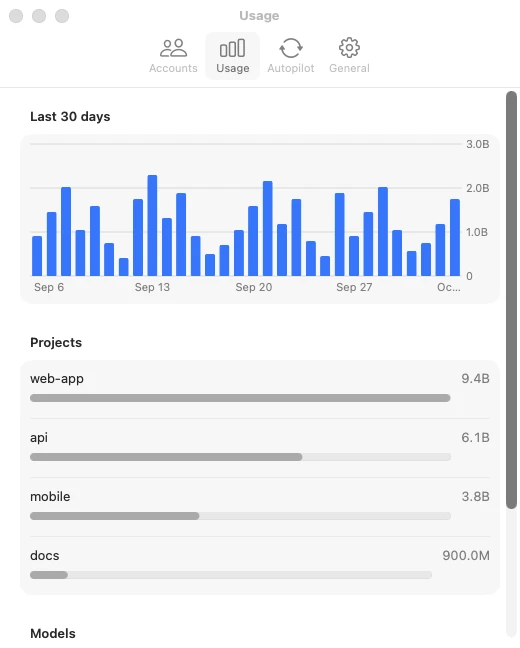
- Usage per day, project and model, read from your local transcripts.
- Stays out of the way
- It lives in the menu bar and runs in the background.
How it decides
It reads the same numbers as /usage, then scores every account:
priority=
weekly % lefthours until it resets
× plan size
Account A 60% left, resets in 24 h → 60 ÷ 24 = 2.5
Account B 90% left, resets in 144 h → 90 ÷ 144 = 0.6
A goes first. Its quota expires sooner.
- Plan size
- Max 20x counts 20, Max 5x counts 5, Pro counts 1.
- Ties
- Use the 5-hour window that resets soonest.
- Limits
- Leaves an account at 97%; only moves to one under 90%.
- Calm
- Stays put unless another account is 1.5 times more urgent.
What it touches
- Reads
- Each account's own login, where its CLI keeps it, and transcripts in
~/.claude/projects. - Writes
- One marked line in
~/.zshrcif you turn on switching, and its own folder in Application Support. - Never
- Copies, logs or uploads a login. Edits your Claude or Codex settings. Sends analytics unless you opt in.
Open source (MIT). Not affiliated with Anthropic or OpenAI.